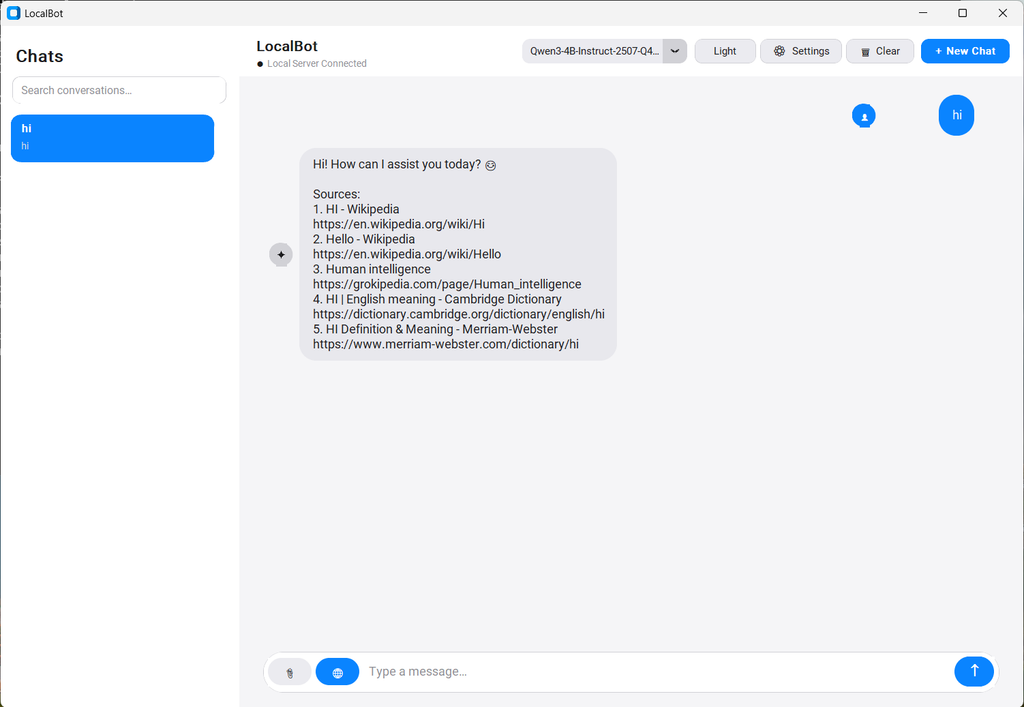
Private, offline AI assistant for your desktop.
LocalBot is a lightweight, cross-platform desktop application that runs open-source GGUF language models entirely on your machine. No cloud APIs, no data leaving your computer, no subscriptions.
Built with Python,
llama-cpp-python, and CustomTkinter, it delivers a modern chat experience with streaming responses, automatic hardware optimization, web search, and document understanding — all while keeping your conversations and files private.Status: Active Beta
Expect rapid iteration, new features, and occasional breaking changes. Feedback and contributions are highly welcome.Why LocalBot?
Most AI tools send your data to remote servers. LocalBot does the opposite:
- Zero data leakage — Inference, history, and attachments stay on disk.
- No API keys or usage limits — Once a model is downloaded, it runs forever offline.
- Hardware-aware — Automatically detects NVIDIA CUDA, AMD ROCm, Apple Silicon (Metal), or falls back to optimized CPU mode.
- Practical features — Toggleable web search (DuckDuckGo, no key), document attachment & extraction (PDF, DOCX, XLSX), persistent conversations, model manager.
Ideal for developers, privacy-conscious users, researchers, and anyone who wants a capable local AI without the complexity of full LLM frameworks.
Key Features
Feature Description Fully local inference Powered by llama-cpp-python+ GGUF modelsStreaming chat Token-by-token generation for responsive UX Model Manager Browse & download models directly from Hugging Face Smart hardware detection Detects GPU vendor, VRAM, RAM, CPU cores and recommends optimal n_gpu_layers+ context sizeBroad hardware support NVIDIA (CUDA), AMD (ROCm), Apple Silicon (Metal), pure CPU Web Search Optional DuckDuckGo search (toggle via globe icon) — no API key required Document understanding Attach PDF, DOCX, XLSX, TXT files; content is extracted and injected into context Persistent conversations SQLite-backed history with titles, load/delete support Modern UI Clean CustomTkinter interface with Dark / Light mode Cross-platform Windows, macOS (Apple Silicon), Linux Standalone releases Pre-built .exe/.appfor Windows 11 and macOS (no Python required)Design principles
- Clear separation of concerns (UI / Engine / Runtime / Storage)
- Graceful degradation (runs without GPU or even without a model loaded)
- Automatic migration of settings and conversation DB across versions
- Conservative context window management to stay within model limits
Tech Stack
- Language: Python 3.10+
- Inference:
llama-cpp-python≥ 0.3.0 (GGUF)- UI: CustomTkinter
- Hardware detection:
psutil,nvidia-ml-py, platform-specific tools (nvidia-smi,rocm-smi,sysctl)- Model download:
huggingface_hub- Web search:
ddgs(DuckDuckGo)- Document parsing:
pypdf,python-docx,openpyxl,pandas- Storage: SQLite
- Packaging: PyInstaller (standalone Windows / macOS builds)
On first launch:
Open Model Manager Download a GGUF model (or point to an existing one) Click Apply Start chatting
Standalone Releases Pre-built binaries are available on the Releases page: https://github.com/Ivan-Dambulov/LocalBot/releases/tag/LocalBot-0.2
Configuration & Data Locations Preferences and conversations are stored in the platform-standard app data directory:
OSPathmacOS~/Library/Application Support/LocalBot/Windows%APPDATA%\LocalBot\Linux~/.localbot/ Contains:
settings.json — model path, GPU layers, context size, theme, etc. conversations.db — chat history models/ — downloaded GGUF files (configurable)
Environment variables for advanced users:
MY_ASSISTANT_MODEL — force model path MY_ASSISTANT_GPU_LAYERS — override GPU layers MY_ASSISTANT_CONTEXT — override context size
Roadmap (ideas)
RAG over local folders Voice input / output Multi-model comparison side-by-side Plugin system for tools Linux AppImage / Flatpak System tray + global hotkey Export conversations (Markdown / JSON)
Contributing Contributions of all kinds are welcome — bug reports, feature requests, pull requests, documentation improvements, or just feedback.